<?xml version="1.0" encoding="utf-8"?><feed xmlns="http://www.w3.org/2005/Atom" ><generator uri="https://jekyllrb.com/" version="3.10.0">Jekyll</generator><link href="https://diegoallgithub.io/feed.xml" rel="self" type="application/atom+xml" /><link href="https://diegoallgithub.io/" rel="alternate" type="text/html" /><updated>2026-08-15T09:00:57+00:00</updated><id>https://diegoallgithub.io/feed.xml</id><title type="html">DiegoAll</title><subtitle>An amazing website.</subtitle><author><name>Diego All</name><email>diegoall@somewhere.com</email></author><entry><title type="html">Falco Custom Rules</title><link href="https://diegoallgithub.io/cyber/kubernetes/falco-custom-rules/" rel="alternate" type="text/html" title="Falco Custom Rules" /><published>2025-02-18T00:00:00+00:00</published><updated>2025-02-18T00:00:00+00:00</updated><id>https://diegoallgithub.io/cyber/kubernetes/falco-custom-rules</id><content type="html" xml:base="https://diegoallgithub.io/cyber/kubernetes/falco-custom-rules/"><![CDATA[<p><!-- ![](/assets/images/falco-test/falco_runtime_security.png) -->
<img src="/assets/images/falco-test/falco_runtime_security.png" alt="Descripción de la imagen" width="500" /></p>

<p>Falco custom rules</p>

<h2 id="miscellaneous-binary-formats">Miscellaneous Binary Formats</h2>

<p>alcohol</p>

<p>alcohol</p>

<p>alcohol</p>

<h2 id="poc">PoC</h2>

<div class="language-plaintext highlighter-rouge"><div class="highlight"><pre class="highlight"><code>Nmap scan report for 10.129.148.141
Host is up (0.018s latency).


Ejemplo custom rule
</code></pre></div></div>

<ul>
  <li><a href="https://github.com/NSAKEY/nsa-rules/blob/master/_NSAKEY.v2.dive.rule">https://github.com/NSAKEY/nsa-rules/blob/master/_NSAKEY.v2.dive.rule</a></li>
  <li><a href="https://github.com/NotSoSecure/password_cracking_rules/blob/master/OneRuleToRuleThemAll.rule">https://github.com/NotSoSecure/password_cracking_rules/blob/master/OneRuleToRuleThemAll.rule</a></li>
</ul>

<p><img src="/assets/images/htb-writeup-delivery/root.png" alt="" /></p>]]></content><author><name>Diego All</name><email>diegoall@somewhere.com</email></author><category term="cyber" /><category term="kubernetes" /><category term="falco" /><category term="runtime security" /><category term="syscall" /><category term="threat detection" /><category term="rules" /><summary type="html"><![CDATA[Falco Custom Rules]]></summary></entry><entry><title type="html">Container Escapes</title><link href="https://diegoallgithub.io/cyber/kubernetes/container-escapes/" rel="alternate" type="text/html" title="Container Escapes" /><published>2025-02-15T00:00:00+00:00</published><updated>2025-02-15T00:00:00+00:00</updated><id>https://diegoallgithub.io/cyber/kubernetes/container-escapes</id><content type="html" xml:base="https://diegoallgithub.io/cyber/kubernetes/container-escapes/"><![CDATA[<p><!-- ![](/assets/images/falco-test/falco_runtime_security.png) -->
<img src="/assets/images/falco-test/falco_runtime_security.png" alt="Descripción de la imagen" width="500" /></p>

<p>Falco custom rules</p>

<h2 id="miscellaneous-binary-formats">Miscellaneous Binary Formats</h2>

<p>binfmt_misc</p>

<p>toffan</p>

<h2 id="poc">PoC</h2>

<div class="language-plaintext highlighter-rouge"><div class="highlight"><pre class="highlight"><code>Nmap scan report for 10.129.148.141
Host is up (0.018s latency).


Ejemplo custom rule
</code></pre></div></div>

<ul>
  <li><a href="https://github.com/NSAKEY/nsa-rules/blob/master/_NSAKEY.v2.dive.rule">https://github.com/NSAKEY/nsa-rules/blob/master/_NSAKEY.v2.dive.rule</a></li>
  <li><a href="https://github.com/NotSoSecure/password_cracking_rules/blob/master/OneRuleToRuleThemAll.rule">https://github.com/NotSoSecure/password_cracking_rules/blob/master/OneRuleToRuleThemAll.rule</a></li>
</ul>

<p><img src="/assets/images/htb-writeup-delivery/root.png" alt="" /></p>]]></content><author><name>Diego All</name><email>diegoall@somewhere.com</email></author><category term="cyber" /><category term="kubernetes" /><category term="falco" /><category term="runtime security" /><category term="syscall" /><category term="threat detection" /><category term="rules" /><summary type="html"><![CDATA[Container Escapes]]></summary></entry><entry><title type="html">Golang secure scaffolding</title><link href="https://diegoallgithub.io/programming/golang-secure-scaffolding/" rel="alternate" type="text/html" title="Golang secure scaffolding" /><published>2025-02-01T00:00:00+00:00</published><updated>2025-02-01T00:00:00+00:00</updated><id>https://diegoallgithub.io/programming/golang-secure-scaffolding</id><content type="html" xml:base="https://diegoallgithub.io/programming/golang-secure-scaffolding/"><![CDATA[<p><!-- ![](/assets/images/falco-test/falco_runtime_security.png) -->
<img src="/assets/images/falco-test/falco_runtime_security.png" alt="Descripción de la imagen" width="500" /></p>

<p>Intro</p>

<h2 id="miscellaneous-binary-formats">Miscellaneous Binary Formats</h2>

<p>binfmt_misc</p>

<p>toffan</p>

<h2 id="poc">PoC</h2>

<div class="language-plaintext highlighter-rouge"><div class="highlight"><pre class="highlight"><code>Nmap scan report for 10.129.148.141
Host is up (0.018s latency).


Ejemplo custom rule
</code></pre></div></div>

<ul>
  <li><a href="https://github.com/NSAKEY/nsa-rules/blob/master/_NSAKEY.v2.dive.rule">https://github.com/NSAKEY/nsa-rules/blob/master/_NSAKEY.v2.dive.rule</a></li>
  <li><a href="https://github.com/NotSoSecure/password_cracking_rules/blob/master/OneRuleToRuleThemAll.rule">https://github.com/NotSoSecure/password_cracking_rules/blob/master/OneRuleToRuleThemAll.rule</a></li>
</ul>

<p><img src="/assets/images/htb-writeup-delivery/root.png" alt="" /></p>]]></content><author><name>Diego All</name><email>diegoall@somewhere.com</email></author><category term="programming" /><category term="golang" /><summary type="html"><![CDATA[Golang secure scaffolding]]></summary></entry><entry><title type="html">Malicious behaviors using binfmt_misc</title><link href="https://diegoallgithub.io/cyber/linux/malicious-behaviors-binfmt-misc/" rel="alternate" type="text/html" title="Malicious behaviors using binfmt_misc" /><published>2024-11-20T00:00:00+00:00</published><updated>2024-11-20T00:00:00+00:00</updated><id>https://diegoallgithub.io/cyber/linux/malicious-behaviors-binfmt-misc</id><content type="html" xml:base="https://diegoallgithub.io/cyber/linux/malicious-behaviors-binfmt-misc/"><![CDATA[<p><!-- ![](/assets/images/falco-test/falco_runtime_security.png) -->
<img src="/assets/images/falco-test/falco_runtime_security.png" alt="Descripción de la imagen" width="500" /></p>

<p>Intro</p>

<h2 id="miscellaneous-binary-formats">Miscellaneous Binary Formats</h2>

<p>binfmt_misc</p>

<p>trin</p>

<p>trin</p>

<p>toffan</p>

<h2 id="poc">PoC</h2>

<div class="language-plaintext highlighter-rouge"><div class="highlight"><pre class="highlight"><code>Nmap scan report for 10.129.148.141
Host is up (0.018s latency).


Ejemplo custom rule
</code></pre></div></div>

<ul>
  <li><a href="https://github.com/NSAKEY/nsa-rules/blob/master/_NSAKEY.v2.dive.rule">https://github.com/NSAKEY/nsa-rules/blob/master/_NSAKEY.v2.dive.rule</a></li>
  <li><a href="https://github.com/NotSoSecure/password_cracking_rules/blob/master/OneRuleToRuleThemAll.rule">https://github.com/NotSoSecure/password_cracking_rules/blob/master/OneRuleToRuleThemAll.rule</a></li>
</ul>

<p><img src="/assets/images/htb-writeup-delivery/root.png" alt="" /></p>]]></content><author><name>Diego All</name><email>diegoall@somewhere.com</email></author><category term="cyber" /><category term="linux" /><category term="privilege_escalation" /><summary type="html"><![CDATA[Behaviors using binfmt_misc]]></summary></entry><entry><title type="html">Falco runtime security</title><link href="https://diegoallgithub.io/cyber/kubernetes/falco-runtime-security/" rel="alternate" type="text/html" title="Falco runtime security" /><published>2024-09-02T00:00:00+00:00</published><updated>2024-09-02T00:00:00+00:00</updated><id>https://diegoallgithub.io/cyber/kubernetes/falco-runtime-security</id><content type="html" xml:base="https://diegoallgithub.io/cyber/kubernetes/falco-runtime-security/"><![CDATA[<p><!-- ![](/assets/images/falco-test/falco_runtime_security.png) -->
<img src="/assets/images/falco-test/falco_runtime_security.png" alt="Descripción de la imagen" width="500" /></p>

<p>Intro</p>

<h2 id="qué-es-falco">¿Qué es Falco?</h2>

<p>Falco es un proyecto creado por sysdig en 2016.
Monitoreo de seguridad en runtime security de contenedores
Evalua  syscalls del contenedor al kernel a través de reglas predefinidas y/o customizadas</p>

<h2 id="por-qué-es-importante-runtime-security">¿Por qué es importante runtime security?</h2>

<p>ola</p>

<h2 id="qué-detecta-falco">¿Qué detecta Falco?</h2>

<p>What Falco checks for?</p>

<h2 id="cómo-funciona-falco">¿Cómo funciona falco?</h2>

<h2 id="cómo-funciona-el-stack-de-detección">¿Cómo funciona el stack de detección?</h2>

<h2 id="opinión-concluir">Opinión (concluir)</h2>

<p><br />
<br /></p>

<details><summary><code> Opinión </code></summary>

##

<br />

Health  &amp; Home Endpoint (pingpong)


    {
        "message": "Hellooooo, Welcome to my crib.",
        "status": true
    }


- USAGE

```
hola
```
&lt;/summary&gt;</details>

<hr />

<h2 id="limitaciones-y-oportunidades-de-mejora">Limitaciones y oportunidades de mejora</h2>

<h2 id="poc">PoC</h2>

<div class="language-plaintext highlighter-rouge"><div class="highlight"><pre class="highlight"><code>Nmap scan report for 10.129.148.141
Host is up (0.018s latency).


Ejemplo custom rule
</code></pre></div></div>

<h2 id="website">Website</h2>

<p><img src="/assets/images/falco-test/user.png" alt="" /></p>

<p>+———————————-+————————————————————–+
| Username                         | Password                                                     |
+———————————-+————————————————————–+
| surveybot                        |                                                              |
| c3ecacacc7b94f909d04dbfd308a9b93 | $2a$10$u5815SIBe2Fq1FZlv9S8I.VjU3zeSPBrIEg9wvpiLaS7ImuiItEiK |
| 5b785171bfb34762a933e127630c4860 | $2a$10$3m0quqyvCE8Z/R1gFcCOWO6tEj6FtqtBn8fRAXQXmaKmg.HDGpS/G |
| root                             | $2a$10$VM6EeymRxJ29r8Wjkr8Dtev0O.1STWb4.4ScG.anuu7v0EFJwgjjO |
| snowscan                         | $2a$10$spHk8ZGr54VWf4kNER/IReO.I63YH9d7WaYp9wjiRswDMR.P/Q9aa |
| ff0a21fc6fc2488195e16ea854c963ee | $2a$10$RnJsISTLc9W3iUcUggl1KOG9vqADED24CQcQ8zvUm1Ir9pxS.Pduq |
| channelexport                    |                                                              |
| 9ecfb4be145d47fda0724f697f35ffaf | $2a$10$s.cLPSjAVgawGOJwB7vrqenPg2lrDtOECRtjwWahOzHfq1CoFyFqm |
+———————————-+————————————————————–+</p>

<ul>
  <li><a href="https://github.com/NSAKEY/nsa-rules/blob/master/_NSAKEY.v2.dive.rule">https://github.com/NSAKEY/nsa-rules/blob/master/_NSAKEY.v2.dive.rule</a></li>
  <li><a href="https://github.com/NotSoSecure/password_cracking_rules/blob/master/OneRuleToRuleThemAll.rule">https://github.com/NotSoSecure/password_cracking_rules/blob/master/OneRuleToRuleThemAll.rule</a></li>
</ul>

<p><img src="/assets/images/htb-writeup-delivery/root.png" alt="" /></p>]]></content><author><name>Diego All</name><email>diegoall@somewhere.com</email></author><category term="cyber" /><category term="kubernetes" /><category term="falco" /><category term="runtime security" /><category term="syscall" /><category term="threat detection" /><category term="rules" /><summary type="html"><![CDATA[Runtime security and threat detection]]></summary></entry><entry><title type="html">Why golang</title><link href="https://diegoallgithub.io/programming/golang/" rel="alternate" type="text/html" title="Why golang" /><published>2024-08-02T00:00:00+00:00</published><updated>2024-08-02T00:00:00+00:00</updated><id>https://diegoallgithub.io/programming/golang</id><content type="html" xml:base="https://diegoallgithub.io/programming/golang/"><![CDATA[<p><img src="/assets/images/falco-test/delivery_logo.png" alt="" /></p>

<p>Buenas noches parcero</p>

<h2 id="panita">Panita</h2>

<div class="language-plaintext highlighter-rouge"><div class="highlight"><pre class="highlight"><code>Nmap scan report for 10.129.148.141
Host is up (0.018s latency).
Not shown: 65532 closed ports
PORT     STATE SERVICE VERSION
22/tcp   open  ssh     OpenSSH 7.9p1 Debian 10+deb10u2 (protocol 2.0)
| ssh-hostkey: 
|   2048 9c:40:fa:85:9b:01:ac:ac:0e:bc:0c:19:51:8a:ee:27 (RSA)
|   256 5a:0c:c0:3b:9b:76:55:2e:6e:c4:f4:b9:5d:76:17:09 (ECDSA)
|_  256 b7:9d:f7:48:9d:a2:f2:76:30:fd:42:d3:35:3a:80:8c (ED25519)
80/tcp   open  http    nginx 1.14.2
|_http-server-header: nginx/1.14.2
|_http-title: Welcome
8065/tcp open  unknown
| fingerprint-strings: 
|   GenericLines, Help, RTSPRequest, SSLSessionReq, TerminalServerCookie: 
|     HTTP/1.1 400 Bad Request
|     Content-Type: text/plain; charset=utf-8
|     Connection: close
|     Request
|   GetRequest: 
|     HTTP/1.0 200 OK
|     Accept-Ranges: bytes
|     Cache-Control: no-cache, max-age=31556926, public
|     Content-Length: 3108
|     Content-Security-Policy: frame-ancestors 'self'; script-src 'self' cdn.rudderlabs.com
|     Content-Type: text/html; charset=utf-8
|     Last-Modified: Sun, 09 May 2021 00:00:02 GMT
|     X-Frame-Options: SAMEORIGIN
|     X-Request-Id: fqrpd5m3ftgnzmxkbieezqadxo
|     X-Version-Id: 5.30.0.5.30.1.57fb31b889bf81d99d8af8176d4bbaaa.false
|     Date: Sun, 09 May 2021 00:01:31 GMT
|     &lt;!doctype html&gt;&lt;html lang="en"&gt;&lt;head&gt;&lt;meta charset="utf-8"&gt;&lt;meta name="viewport" content="width=device-width,initial-scale=1,maximum-scale=1,user-scalable=0"&gt;&lt;meta name="robots" content="noindex, nofollow"&gt;&lt;meta name="referrer" content="no-referrer"&gt;&lt;title&gt;Mattermost&lt;/title&gt;&lt;meta name="mobile-web-app-capable" content="yes"&gt;&lt;meta name="application-name" content="Mattermost"&gt;&lt;meta name="format-detection" content="telephone=no"&gt;&lt;link re
|   HTTPOptions: 
|     HTTP/1.0 405 Method Not Allowed
|     Date: Sun, 09 May 2021 00:01:31 GMT
|_    Content-Length: 0
</code></pre></div></div>

<h2 id="website">Website</h2>

<p>The Delivery website is pretty basic, there’s a link to a vhost called helpdesk.delivery.htb and a contact us section. We’ll add this entry to our local host before proceeding further.</p>

<p><img src="/assets/images/htb-writeup-delivery/website1.png" alt="" /></p>

<p>The contact us section tells us we need an @delivery.htb email address and tells us port 8065 is a MatterMost server. MatterMost is a Slack-like collaboration platform that can be self-hosted.</p>

<p><img src="/assets/images/htb-writeup-delivery/website2.png" alt="" /></p>

<p>Browsing to port 8065 we get the MatterMost login page but we don’t have credentials yet</p>

<p><img src="/assets/images/htb-writeup-delivery/mm1.png" alt="" /></p>

<h2 id="helpdesk">Helpdesk</h2>

<p>The Helpdesk page uses the OsTicket web application. It allows users to create and view the status of ticket.</p>

<p><img src="/assets/images/htb-writeup-delivery/helpdesk3.png" alt="" /></p>

<p>We can still open new tickets even if we only have a guest user.</p>

<p><img src="/assets/images/htb-writeup-delivery/helpdesk1.png" alt="" /></p>

<p>After a ticket has been created, the system generates a random @delivery.htb email account with the ticket ID.</p>

<p><img src="/assets/images/htb-writeup-delivery/helpdesk2.png" alt="" /></p>

<p>Now that we have an email account we can create a MatterMost account.</p>

<p><img src="/assets/images/htb-writeup-delivery/mm2.png" alt="" /></p>

<p>A confirmation email is then sent to our ticket status inbox.</p>

<p><img src="/assets/images/htb-writeup-delivery/mm3.png" alt="" /></p>

<p>We use the check ticket function on the OsTicket application and submit the original email address we used when creating the ticket and the ticket ID.</p>

<p><img src="/assets/images/htb-writeup-delivery/mm4.png" alt="" /></p>

<p>We’re now logged in and we see that the MatterMost confirmation email has been added to the ticket information.</p>

<p><img src="/assets/images/htb-writeup-delivery/mm5.png" alt="" /></p>

<p>To confirm the creation of our account we’ll just copy/paste the included link into a browser new tab.</p>

<p><img src="/assets/images/htb-writeup-delivery/mm6.png" alt="" /></p>

<p>After logging in to MatterMost we have access to the Internal channel where we see that credentials have been posted. There’s also a hint that we’ll have to use a variation of the PleaseSubscribe! password later.</p>

<p><img src="/assets/images/htb-writeup-delivery/mm7.png" alt="" /></p>

<h2 id="user-shell">User shell</h2>

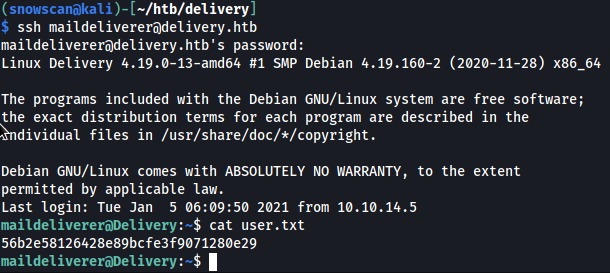
<p>With the maildeliverer / Youve_G0t_Mail! credentials we can SSH in and get the user flag.</p>

<p><img src="/assets/images/falco-test/user.png" alt="" /></p>

<h2 id="credentials-in-mysql-database">Credentials in MySQL database</h2>

<p>After doing some recon we find the MatterMost installation directory in /opt/mattermost:</p>

<p>maildeliverer@Delivery:/opt/mattermost/config$ ps waux | grep -i mattermost
matterm+   741  0.2  3.3 1649596 135112 ?      Ssl  20:00   0:07 /opt/mattermost/bin/mattermost</p>

<p>The config.json file contains the password for the MySQL database:</p>

<p>[…]
“SqlSettings”: {
        “DriverName”: “mysql”,
        “DataSource”: “mmuser:Crack_The_MM_Admin_PW@tcp(127.0.0.1:3306)/mattermost?charset=utf8mb4,utf8\u0026readTimeout=30s\u0026writeTimeout=30s”,
[…]</p>

<p>We’ll connect to the database server and poke around.</p>

<p>maildeliverer@Delivery:/$ mysql -u mmuser –password=’Crack_The_MM_Admin_PW’
Welcome to the MariaDB monitor.  Commands end with ; or \g.
Your MariaDB connection id is 91
Server version: 10.3.27-MariaDB-0+deb10u1 Debian 10</p>

<p>Copyright (c) 2000, 2018, Oracle, MariaDB Corporation Ab and others.</p>

<p>Type ‘help;’ or ‘\h’ for help. Type ‘\c’ to clear the current input statement.</p>

<p>MariaDB [(none)]&gt; show databases;
+——————–+
| Database           |
+——————–+
| information_schema |
| mattermost         |
+——————–+</p>

<p>MatterMost user accounts are stored in the Users table and hashed with bcrypt. We’ll save the hashes then try to crack them offline.</p>

<p>MariaDB [(none)]&gt; use mattermost;
Reading table information for completion of table and column names
You can turn off this feature to get a quicker startup with -A</p>

<p>Database changed
MariaDB [mattermost]&gt; select Username,Password from Users;
+———————————-+————————————————————–+
| Username                         | Password                                                     |
+———————————-+————————————————————–+
| surveybot                        |                                                              |
| c3ecacacc7b94f909d04dbfd308a9b93 | $2a$10$u5815SIBe2Fq1FZlv9S8I.VjU3zeSPBrIEg9wvpiLaS7ImuiItEiK |
| 5b785171bfb34762a933e127630c4860 | $2a$10$3m0quqyvCE8Z/R1gFcCOWO6tEj6FtqtBn8fRAXQXmaKmg.HDGpS/G |
| root                             | $2a$10$VM6EeymRxJ29r8Wjkr8Dtev0O.1STWb4.4ScG.anuu7v0EFJwgjjO |
| snowscan                         | $2a$10$spHk8ZGr54VWf4kNER/IReO.I63YH9d7WaYp9wjiRswDMR.P/Q9aa |
| ff0a21fc6fc2488195e16ea854c963ee | $2a$10$RnJsISTLc9W3iUcUggl1KOG9vqADED24CQcQ8zvUm1Ir9pxS.Pduq |
| channelexport                    |                                                              |
| 9ecfb4be145d47fda0724f697f35ffaf | $2a$10$s.cLPSjAVgawGOJwB7vrqenPg2lrDtOECRtjwWahOzHfq1CoFyFqm |
+———————————-+————————————————————–+
8 rows in set (0.002 sec)</p>

<h2 id="cracking-with-rules">Cracking with rules</h2>

<p>There was a hint earlier that some variation of PleaseSubscribe! is used.</p>

<p>I’ll use hashcat for this and since I don’t know the hash ID for bcrypt by heart I can find it in the help.</p>

<table>
  <tbody>
    <tr>
      <td>C:\bin\hashcat&gt;hashcat –help</td>
      <td>findstr bcrypt</td>
      <td> </td>
    </tr>
    <tr>
      <td>3200</td>
      <td>bcrypt $2*$, Blowfish (Unix)</td>
      <td>Operating System</td>
    </tr>
  </tbody>
</table>

<p>My go-to rules is normally one of those two ruleset:</p>

<ul>
  <li><a href="https://github.com/NSAKEY/nsa-rules/blob/master/_NSAKEY.v2.dive.rule">https://github.com/NSAKEY/nsa-rules/blob/master/_NSAKEY.v2.dive.rule</a></li>
  <li><a href="https://github.com/NotSoSecure/password_cracking_rules/blob/master/OneRuleToRuleThemAll.rule">https://github.com/NotSoSecure/password_cracking_rules/blob/master/OneRuleToRuleThemAll.rule</a></li>
</ul>

<p>These will perform all sort of transformations on the wordlist and we can quickly crack the password: PleaseSubscribe!21</p>

<p>C:\bin\hashcat&gt;hashcat -a 0 -m 3200 -w 3 -O -r rules_NSAKEY.v2.dive.rule hash.txt wordlist.txt
[…]
$2a$10$VM6EeymRxJ29r8Wjkr8Dtev0O.1STWb4.4ScG.anuu7v0EFJwgjjO:PleaseSubscribe!21</p>

<p>Session……….: hashcat
Status………..: Cracked
Hash.Name……..: bcrypt $2*$, Blowfish (Unix)
[…]</p>

<p>The root password from MatterMost is the same as the local root password so we can just su to root and get the system flag.</p>

<p><img src="/assets/images/htb-writeup-delivery/root.png" alt="" /></p>]]></content><author><name>Diego All</name><email>diegoall@somewhere.com</email></author><category term="programming" /><category term="golang" /><summary type="html"><![CDATA[Advantages of Golang]]></summary></entry><entry><title type="html">Beauty Math</title><link href="https://diegoallgithub.io/beauty%20math/beauty-math/" rel="alternate" type="text/html" title="Beauty Math" /><published>2024-07-02T00:00:00+00:00</published><updated>2024-07-02T00:00:00+00:00</updated><id>https://diegoallgithub.io/beauty%20math/beauty-math</id><content type="html" xml:base="https://diegoallgithub.io/beauty%20math/beauty-math/"><![CDATA[<p><img src="/assets/images/falco-test/delivery_logo.png" alt="" /></p>

<p>Buenas noches parcero</p>

<h2 id="panita">Panita</h2>

<div class="language-plaintext highlighter-rouge"><div class="highlight"><pre class="highlight"><code>Nmap scan report for 10.129.148.141
Host is up (0.018s latency).
Not shown: 65532 closed ports
PORT     STATE SERVICE VERSION
22/tcp   open  ssh     OpenSSH 7.9p1 Debian 10+deb10u2 (protocol 2.0)
| ssh-hostkey: 
|   2048 9c:40:fa:85:9b:01:ac:ac:0e:bc:0c:19:51:8a:ee:27 (RSA)
|   256 5a:0c:c0:3b:9b:76:55:2e:6e:c4:f4:b9:5d:76:17:09 (ECDSA)
|_  256 b7:9d:f7:48:9d:a2:f2:76:30:fd:42:d3:35:3a:80:8c (ED25519)
80/tcp   open  http    nginx 1.14.2
|_http-server-header: nginx/1.14.2
|_http-title: Welcome
8065/tcp open  unknown
| fingerprint-strings: 
|   GenericLines, Help, RTSPRequest, SSLSessionReq, TerminalServerCookie: 
|     HTTP/1.1 400 Bad Request
|     Content-Type: text/plain; charset=utf-8
|     Connection: close
|     Request
|   GetRequest: 
|     HTTP/1.0 200 OK
|     Accept-Ranges: bytes
|     Cache-Control: no-cache, max-age=31556926, public
|     Content-Length: 3108
|     Content-Security-Policy: frame-ancestors 'self'; script-src 'self' cdn.rudderlabs.com
|     Content-Type: text/html; charset=utf-8
|     Last-Modified: Sun, 09 May 2021 00:00:02 GMT
|     X-Frame-Options: SAMEORIGIN
|     X-Request-Id: fqrpd5m3ftgnzmxkbieezqadxo
|     X-Version-Id: 5.30.0.5.30.1.57fb31b889bf81d99d8af8176d4bbaaa.false
|     Date: Sun, 09 May 2021 00:01:31 GMT
|     &lt;!doctype html&gt;&lt;html lang="en"&gt;&lt;head&gt;&lt;meta charset="utf-8"&gt;&lt;meta name="viewport" content="width=device-width,initial-scale=1,maximum-scale=1,user-scalable=0"&gt;&lt;meta name="robots" content="noindex, nofollow"&gt;&lt;meta name="referrer" content="no-referrer"&gt;&lt;title&gt;Mattermost&lt;/title&gt;&lt;meta name="mobile-web-app-capable" content="yes"&gt;&lt;meta name="application-name" content="Mattermost"&gt;&lt;meta name="format-detection" content="telephone=no"&gt;&lt;link re
|   HTTPOptions: 
|     HTTP/1.0 405 Method Not Allowed
|     Date: Sun, 09 May 2021 00:01:31 GMT
|_    Content-Length: 0
</code></pre></div></div>

<h2 id="website">Website</h2>

<p>The Delivery website is pretty basic, there’s a link to a vhost called helpdesk.delivery.htb and a contact us section. We’ll add this entry to our local host before proceeding further.</p>

<p><img src="/assets/images/htb-writeup-delivery/website1.png" alt="" /></p>

<p>The contact us section tells us we need an @delivery.htb email address and tells us port 8065 is a MatterMost server. MatterMost is a Slack-like collaboration platform that can be self-hosted.</p>

<p><img src="/assets/images/htb-writeup-delivery/website2.png" alt="" /></p>

<p>Browsing to port 8065 we get the MatterMost login page but we don’t have credentials yet</p>

<p><img src="/assets/images/htb-writeup-delivery/mm1.png" alt="" /></p>

<h2 id="helpdesk">Helpdesk</h2>

<p>The Helpdesk page uses the OsTicket web application. It allows users to create and view the status of ticket.</p>

<p><img src="/assets/images/htb-writeup-delivery/helpdesk3.png" alt="" /></p>

<p>We can still open new tickets even if we only have a guest user.</p>

<p><img src="/assets/images/htb-writeup-delivery/helpdesk1.png" alt="" /></p>

<p>After a ticket has been created, the system generates a random @delivery.htb email account with the ticket ID.</p>

<p><img src="/assets/images/htb-writeup-delivery/helpdesk2.png" alt="" /></p>

<p>Now that we have an email account we can create a MatterMost account.</p>

<p><img src="/assets/images/htb-writeup-delivery/mm2.png" alt="" /></p>

<p>A confirmation email is then sent to our ticket status inbox.</p>

<p><img src="/assets/images/htb-writeup-delivery/mm3.png" alt="" /></p>

<p>We use the check ticket function on the OsTicket application and submit the original email address we used when creating the ticket and the ticket ID.</p>

<p><img src="/assets/images/htb-writeup-delivery/mm4.png" alt="" /></p>

<p>We’re now logged in and we see that the MatterMost confirmation email has been added to the ticket information.</p>

<p><img src="/assets/images/htb-writeup-delivery/mm5.png" alt="" /></p>

<p>To confirm the creation of our account we’ll just copy/paste the included link into a browser new tab.</p>

<p><img src="/assets/images/htb-writeup-delivery/mm6.png" alt="" /></p>

<p>After logging in to MatterMost we have access to the Internal channel where we see that credentials have been posted. There’s also a hint that we’ll have to use a variation of the PleaseSubscribe! password later.</p>

<p><img src="/assets/images/htb-writeup-delivery/mm7.png" alt="" /></p>

<h2 id="user-shell">User shell</h2>

<p>With the maildeliverer / Youve_G0t_Mail! credentials we can SSH in and get the user flag.</p>

<p><img src="/assets/images/falco-test/user.png" alt="" /></p>

<h2 id="credentials-in-mysql-database">Credentials in MySQL database</h2>

<p>After doing some recon we find the MatterMost installation directory in /opt/mattermost:</p>

<p>maildeliverer@Delivery:/opt/mattermost/config$ ps waux | grep -i mattermost
matterm+   741  0.2  3.3 1649596 135112 ?      Ssl  20:00   0:07 /opt/mattermost/bin/mattermost</p>

<p>The config.json file contains the password for the MySQL database:</p>

<p>[…]
“SqlSettings”: {
        “DriverName”: “mysql”,
        “DataSource”: “mmuser:Crack_The_MM_Admin_PW@tcp(127.0.0.1:3306)/mattermost?charset=utf8mb4,utf8\u0026readTimeout=30s\u0026writeTimeout=30s”,
[…]</p>

<p>We’ll connect to the database server and poke around.</p>

<p>maildeliverer@Delivery:/$ mysql -u mmuser –password=’Crack_The_MM_Admin_PW’
Welcome to the MariaDB monitor.  Commands end with ; or \g.
Your MariaDB connection id is 91
Server version: 10.3.27-MariaDB-0+deb10u1 Debian 10</p>

<p>Copyright (c) 2000, 2018, Oracle, MariaDB Corporation Ab and others.</p>

<p>Type ‘help;’ or ‘\h’ for help. Type ‘\c’ to clear the current input statement.</p>

<p>MariaDB [(none)]&gt; show databases;
+——————–+
| Database           |
+——————–+
| information_schema |
| mattermost         |
+——————–+</p>

<p>MatterMost user accounts are stored in the Users table and hashed with bcrypt. We’ll save the hashes then try to crack them offline.</p>

<p>MariaDB [(none)]&gt; use mattermost;
Reading table information for completion of table and column names
You can turn off this feature to get a quicker startup with -A</p>

<p>Database changed
MariaDB [mattermost]&gt; select Username,Password from Users;
+———————————-+————————————————————–+
| Username                         | Password                                                     |
+———————————-+————————————————————–+
| surveybot                        |                                                              |
| c3ecacacc7b94f909d04dbfd308a9b93 | $2a$10$u5815SIBe2Fq1FZlv9S8I.VjU3zeSPBrIEg9wvpiLaS7ImuiItEiK |
| 5b785171bfb34762a933e127630c4860 | $2a$10$3m0quqyvCE8Z/R1gFcCOWO6tEj6FtqtBn8fRAXQXmaKmg.HDGpS/G |
| root                             | $2a$10$VM6EeymRxJ29r8Wjkr8Dtev0O.1STWb4.4ScG.anuu7v0EFJwgjjO |
| snowscan                         | $2a$10$spHk8ZGr54VWf4kNER/IReO.I63YH9d7WaYp9wjiRswDMR.P/Q9aa |
| ff0a21fc6fc2488195e16ea854c963ee | $2a$10$RnJsISTLc9W3iUcUggl1KOG9vqADED24CQcQ8zvUm1Ir9pxS.Pduq |
| channelexport                    |                                                              |
| 9ecfb4be145d47fda0724f697f35ffaf | $2a$10$s.cLPSjAVgawGOJwB7vrqenPg2lrDtOECRtjwWahOzHfq1CoFyFqm |
+———————————-+————————————————————–+
8 rows in set (0.002 sec)</p>

<h2 id="cracking-with-rules">Cracking with rules</h2>

<p>There was a hint earlier that some variation of PleaseSubscribe! is used.</p>

<p>I’ll use hashcat for this and since I don’t know the hash ID for bcrypt by heart I can find it in the help.</p>

<table>
  <tbody>
    <tr>
      <td>C:\bin\hashcat&gt;hashcat –help</td>
      <td>findstr bcrypt</td>
      <td> </td>
    </tr>
    <tr>
      <td>3200</td>
      <td>bcrypt $2*$, Blowfish (Unix)</td>
      <td>Operating System</td>
    </tr>
  </tbody>
</table>

<p>My go-to rules is normally one of those two ruleset:</p>

<ul>
  <li><a href="https://github.com/NSAKEY/nsa-rules/blob/master/_NSAKEY.v2.dive.rule">https://github.com/NSAKEY/nsa-rules/blob/master/_NSAKEY.v2.dive.rule</a></li>
  <li><a href="https://github.com/NotSoSecure/password_cracking_rules/blob/master/OneRuleToRuleThemAll.rule">https://github.com/NotSoSecure/password_cracking_rules/blob/master/OneRuleToRuleThemAll.rule</a></li>
</ul>

<p>These will perform all sort of transformations on the wordlist and we can quickly crack the password: PleaseSubscribe!21</p>

<p>C:\bin\hashcat&gt;hashcat -a 0 -m 3200 -w 3 -O -r rules_NSAKEY.v2.dive.rule hash.txt wordlist.txt
[…]
$2a$10$VM6EeymRxJ29r8Wjkr8Dtev0O.1STWb4.4ScG.anuu7v0EFJwgjjO:PleaseSubscribe!21</p>

<p>Session……….: hashcat
Status………..: Cracked
Hash.Name……..: bcrypt $2*$, Blowfish (Unix)
[…]</p>

<p>The root password from MatterMost is the same as the local root password so we can just su to root and get the system flag.</p>

<p><img src="/assets/images/htb-writeup-delivery/root.png" alt="" /></p>]]></content><author><name>Diego All</name><email>diegoall@somewhere.com</email></author><category term="beauty math" /><category term="nature" /><summary type="html"><![CDATA[beauty math and shapes in nature.]]></summary></entry><entry><title type="html">Netcat like a pro</title><link href="https://diegoallgithub.io/cyber/networking/netcat-like-a-pro/" rel="alternate" type="text/html" title="Netcat like a pro" /><published>2022-09-02T00:00:00+00:00</published><updated>2022-09-02T00:00:00+00:00</updated><id>https://diegoallgithub.io/cyber/networking/netcat-like-a-pro</id><content type="html" xml:base="https://diegoallgithub.io/cyber/networking/netcat-like-a-pro/"><![CDATA[<p><img src="/assets/images/falco-test/delivery_logo.png" alt="" /></p>

<p>Buenas noches parcero</p>

<h2 id="panita">Panita</h2>

<p>que mas pues</p>

<div class="language-plaintext highlighter-rouge"><div class="highlight"><pre class="highlight"><code>Nmap scan report for 10.129.148.141
Host is up (0.018s latency).
Not shown: 65532 closed ports
PORT     STATE SERVICE VERSION
22/tcp   open  ssh     OpenSSH 7.9p1 Debian 10+deb10u2 (protocol 2.0)
| ssh-hostkey: 
|   2048 9c:40:fa:85:9b:01:ac:ac:0e:bc:0c:19:51:8a:ee:27 (RSA)
|   256 5a:0c:c0:3b:9b:76:55:2e:6e:c4:f4:b9:5d:76:17:09 (ECDSA)
|_  256 b7:9d:f7:48:9d:a2:f2:76:30:fd:42:d3:35:3a:80:8c (ED25519)
80/tcp   open  http    nginx 1.14.2
|_http-server-header: nginx/1.14.2
|_http-title: Welcome
8065/tcp open  unknown
| fingerprint-strings: 
|   GenericLines, Help, RTSPRequest, SSLSessionReq, TerminalServerCookie: 
|     HTTP/1.1 400 Bad Request
|     Content-Type: text/plain; charset=utf-8
|     Connection: close
|     Request
|   GetRequest: 
|     HTTP/1.0 200 OK
|     Accept-Ranges: bytes
|     Cache-Control: no-cache, max-age=31556926, public
|     Content-Length: 3108
|     Content-Security-Policy: frame-ancestors 'self'; script-src 'self' cdn.rudderlabs.com
|     Content-Type: text/html; charset=utf-8
|     Last-Modified: Sun, 09 May 2021 00:00:02 GMT
|     X-Frame-Options: SAMEORIGIN
|     X-Request-Id: fqrpd5m3ftgnzmxkbieezqadxo
|     X-Version-Id: 5.30.0.5.30.1.57fb31b889bf81d99d8af8176d4bbaaa.false
|     Date: Sun, 09 May 2021 00:01:31 GMT
|     &lt;!doctype html&gt;&lt;html lang="en"&gt;&lt;head&gt;&lt;meta charset="utf-8"&gt;&lt;meta name="viewport" content="width=device-width,initial-scale=1,maximum-scale=1,user-scalable=0"&gt;&lt;meta name="robots" content="noindex, nofollow"&gt;&lt;meta name="referrer" content="no-referrer"&gt;&lt;title&gt;Mattermost&lt;/title&gt;&lt;meta name="mobile-web-app-capable" content="yes"&gt;&lt;meta name="application-name" content="Mattermost"&gt;&lt;meta name="format-detection" content="telephone=no"&gt;&lt;link re
|   HTTPOptions: 
|     HTTP/1.0 405 Method Not Allowed
|     Date: Sun, 09 May 2021 00:01:31 GMT
|_    Content-Length: 0
</code></pre></div></div>

<h2 id="website">Website</h2>

<p>The Delivery website is pretty basic, there’s a link to a vhost called helpdesk.delivery.htb and a contact us section. We’ll add this entry to our local host before proceeding further.</p>

<p><img src="/assets/images/htb-writeup-delivery/website1.png" alt="" /></p>

<p>The contact us section tells us we need an @delivery.htb email address and tells us port 8065 is a MatterMost server. MatterMost is a Slack-like collaboration platform that can be self-hosted.</p>

<p><img src="/assets/images/htb-writeup-delivery/website2.png" alt="" /></p>

<p>Browsing to port 8065 we get the MatterMost login page but we don’t have credentials yet</p>

<p><img src="/assets/images/htb-writeup-delivery/mm1.png" alt="" /></p>

<h2 id="helpdesk">Helpdesk</h2>

<p>The Helpdesk page uses the OsTicket web application. It allows users to create and view the status of ticket.</p>

<p><img src="/assets/images/htb-writeup-delivery/helpdesk3.png" alt="" /></p>

<p>We can still open new tickets even if we only have a guest user.</p>

<p><img src="/assets/images/htb-writeup-delivery/helpdesk1.png" alt="" /></p>

<p>After a ticket has been created, the system generates a random @delivery.htb email account with the ticket ID.</p>

<p><img src="/assets/images/htb-writeup-delivery/helpdesk2.png" alt="" /></p>

<p>Now that we have an email account we can create a MatterMost account.</p>

<p><img src="/assets/images/htb-writeup-delivery/mm2.png" alt="" /></p>

<p>A confirmation email is then sent to our ticket status inbox.</p>

<p><img src="/assets/images/htb-writeup-delivery/mm3.png" alt="" /></p>

<p>We use the check ticket function on the OsTicket application and submit the original email address we used when creating the ticket and the ticket ID.</p>

<p><img src="/assets/images/htb-writeup-delivery/mm4.png" alt="" /></p>

<p>We’re now logged in and we see that the MatterMost confirmation email has been added to the ticket information.</p>

<p><img src="/assets/images/htb-writeup-delivery/mm5.png" alt="" /></p>

<p>To confirm the creation of our account we’ll just copy/paste the included link into a browser new tab.</p>

<p><img src="/assets/images/htb-writeup-delivery/mm6.png" alt="" /></p>

<p>After logging in to MatterMost we have access to the Internal channel where we see that credentials have been posted. There’s also a hint that we’ll have to use a variation of the PleaseSubscribe! password later.</p>

<p><img src="/assets/images/htb-writeup-delivery/mm7.png" alt="" /></p>

<h2 id="user-shell">User shell</h2>

<p>With the maildeliverer / Youve_G0t_Mail! credentials we can SSH in and get the user flag.</p>

<p><img src="/assets/images/falco-test/user.png" alt="" /></p>

<h2 id="credentials-in-mysql-database">Credentials in MySQL database</h2>

<p>After doing some recon we find the MatterMost installation directory in /opt/mattermost:</p>

<p>maildeliverer@Delivery:/opt/mattermost/config$ ps waux | grep -i mattermost
matterm+   741  0.2  3.3 1649596 135112 ?      Ssl  20:00   0:07 /opt/mattermost/bin/mattermost</p>

<p>The config.json file contains the password for the MySQL database:</p>

<p>[…]
“SqlSettings”: {
        “DriverName”: “mysql”,
        “DataSource”: “mmuser:Crack_The_MM_Admin_PW@tcp(127.0.0.1:3306)/mattermost?charset=utf8mb4,utf8\u0026readTimeout=30s\u0026writeTimeout=30s”,
[…]</p>

<p>We’ll connect to the database server and poke around.</p>

<p>maildeliverer@Delivery:/$ mysql -u mmuser –password=’Crack_The_MM_Admin_PW’
Welcome to the MariaDB monitor.  Commands end with ; or \g.
Your MariaDB connection id is 91
Server version: 10.3.27-MariaDB-0+deb10u1 Debian 10</p>

<p>Copyright (c) 2000, 2018, Oracle, MariaDB Corporation Ab and others.</p>

<p>Type ‘help;’ or ‘\h’ for help. Type ‘\c’ to clear the current input statement.</p>

<p>MariaDB [(none)]&gt; show databases;
+——————–+
| Database           |
+——————–+
| information_schema |
| mattermost         |
+——————–+</p>

<p>MatterMost user accounts are stored in the Users table and hashed with bcrypt. We’ll save the hashes then try to crack them offline.</p>

<p>MariaDB [(none)]&gt; use mattermost;
Reading table information for completion of table and column names
You can turn off this feature to get a quicker startup with -A</p>

<p>Database changed
MariaDB [mattermost]&gt; select Username,Password from Users;
+———————————-+————————————————————–+
| Username                         | Password                                                     |
+———————————-+————————————————————–+
| surveybot                        |                                                              |
| c3ecacacc7b94f909d04dbfd308a9b93 | $2a$10$u5815SIBe2Fq1FZlv9S8I.VjU3zeSPBrIEg9wvpiLaS7ImuiItEiK |
| 5b785171bfb34762a933e127630c4860 | $2a$10$3m0quqyvCE8Z/R1gFcCOWO6tEj6FtqtBn8fRAXQXmaKmg.HDGpS/G |
| root                             | $2a$10$VM6EeymRxJ29r8Wjkr8Dtev0O.1STWb4.4ScG.anuu7v0EFJwgjjO |
| snowscan                         | $2a$10$spHk8ZGr54VWf4kNER/IReO.I63YH9d7WaYp9wjiRswDMR.P/Q9aa |
| ff0a21fc6fc2488195e16ea854c963ee | $2a$10$RnJsISTLc9W3iUcUggl1KOG9vqADED24CQcQ8zvUm1Ir9pxS.Pduq |
| channelexport                    |                                                              |
| 9ecfb4be145d47fda0724f697f35ffaf | $2a$10$s.cLPSjAVgawGOJwB7vrqenPg2lrDtOECRtjwWahOzHfq1CoFyFqm |
+———————————-+————————————————————–+
8 rows in set (0.002 sec)</p>

<h2 id="cracking-with-rules">Cracking with rules</h2>

<p>There was a hint earlier that some variation of PleaseSubscribe! is used.</p>

<p>I’ll use hashcat for this and since I don’t know the hash ID for bcrypt by heart I can find it in the help.</p>

<table>
  <tbody>
    <tr>
      <td>C:\bin\hashcat&gt;hashcat –help</td>
      <td>findstr bcrypt</td>
      <td> </td>
    </tr>
    <tr>
      <td>3200</td>
      <td>bcrypt $2*$, Blowfish (Unix)</td>
      <td>Operating System</td>
    </tr>
  </tbody>
</table>

<p>My go-to rules is normally one of those two ruleset:</p>

<ul>
  <li><a href="https://github.com/NSAKEY/nsa-rules/blob/master/_NSAKEY.v2.dive.rule">https://github.com/NSAKEY/nsa-rules/blob/master/_NSAKEY.v2.dive.rule</a></li>
  <li><a href="https://github.com/NotSoSecure/password_cracking_rules/blob/master/OneRuleToRuleThemAll.rule">https://github.com/NotSoSecure/password_cracking_rules/blob/master/OneRuleToRuleThemAll.rule</a></li>
</ul>

<p>These will perform all sort of transformations on the wordlist and we can quickly crack the password: PleaseSubscribe!21</p>

<p>C:\bin\hashcat&gt;hashcat -a 0 -m 3200 -w 3 -O -r rules_NSAKEY.v2.dive.rule hash.txt wordlist.txt
[…]
$2a$10$VM6EeymRxJ29r8Wjkr8Dtev0O.1STWb4.4ScG.anuu7v0EFJwgjjO:PleaseSubscribe!21</p>

<p>Session……….: hashcat
Status………..: Cracked
Hash.Name……..: bcrypt $2*$, Blowfish (Unix)
[…]</p>

<p>The root password from MatterMost is the same as the local root password so we can just su to root and get the system flag.</p>

<p><img src="/assets/images/htb-writeup-delivery/root.png" alt="" /></p>]]></content><author><name>Diego All</name><email>diegoall@somewhere.com</email></author><category term="cyber" /><category term="networking" /><category term="netcat" /><category term="network tools" /><summary type="html"><![CDATA[Netcat examples]]></summary></entry><entry><title type="html">Why python</title><link href="https://diegoallgithub.io/programming/python/" rel="alternate" type="text/html" title="Why python" /><published>2022-08-02T00:00:00+00:00</published><updated>2022-08-02T00:00:00+00:00</updated><id>https://diegoallgithub.io/programming/python</id><content type="html" xml:base="https://diegoallgithub.io/programming/python/"><![CDATA[<p><img src="/assets/images/falco-test/delivery_logo.png" alt="" /></p>

<p>Buenas noches parcero</p>

<h2 id="panita">Panita</h2>

<div class="language-plaintext highlighter-rouge"><div class="highlight"><pre class="highlight"><code>Nmap scan report for 10.129.148.141
Host is up (0.018s latency).
Not shown: 65532 closed ports
PORT     STATE SERVICE VERSION
22/tcp   open  ssh     OpenSSH 7.9p1 Debian 10+deb10u2 (protocol 2.0)
| ssh-hostkey: 
|   2048 9c:40:fa:85:9b:01:ac:ac:0e:bc:0c:19:51:8a:ee:27 (RSA)
|   256 5a:0c:c0:3b:9b:76:55:2e:6e:c4:f4:b9:5d:76:17:09 (ECDSA)
|_  256 b7:9d:f7:48:9d:a2:f2:76:30:fd:42:d3:35:3a:80:8c (ED25519)
80/tcp   open  http    nginx 1.14.2
|_http-server-header: nginx/1.14.2
|_http-title: Welcome
8065/tcp open  unknown
| fingerprint-strings: 
|   GenericLines, Help, RTSPRequest, SSLSessionReq, TerminalServerCookie: 
|     HTTP/1.1 400 Bad Request
|     Content-Type: text/plain; charset=utf-8
|     Connection: close
|     Request
|   GetRequest: 
|     HTTP/1.0 200 OK
|     Accept-Ranges: bytes
|     Cache-Control: no-cache, max-age=31556926, public
|     Content-Length: 3108
|     Content-Security-Policy: frame-ancestors 'self'; script-src 'self' cdn.rudderlabs.com
|     Content-Type: text/html; charset=utf-8
|     Last-Modified: Sun, 09 May 2021 00:00:02 GMT
|     X-Frame-Options: SAMEORIGIN
|     X-Request-Id: fqrpd5m3ftgnzmxkbieezqadxo
|     X-Version-Id: 5.30.0.5.30.1.57fb31b889bf81d99d8af8176d4bbaaa.false
|     Date: Sun, 09 May 2021 00:01:31 GMT
|     &lt;!doctype html&gt;&lt;html lang="en"&gt;&lt;head&gt;&lt;meta charset="utf-8"&gt;&lt;meta name="viewport" content="width=device-width,initial-scale=1,maximum-scale=1,user-scalable=0"&gt;&lt;meta name="robots" content="noindex, nofollow"&gt;&lt;meta name="referrer" content="no-referrer"&gt;&lt;title&gt;Mattermost&lt;/title&gt;&lt;meta name="mobile-web-app-capable" content="yes"&gt;&lt;meta name="application-name" content="Mattermost"&gt;&lt;meta name="format-detection" content="telephone=no"&gt;&lt;link re
|   HTTPOptions: 
|     HTTP/1.0 405 Method Not Allowed
|     Date: Sun, 09 May 2021 00:01:31 GMT
|_    Content-Length: 0
</code></pre></div></div>

<h2 id="website">Website</h2>

<p>The Delivery website is pretty basic, there’s a link to a vhost called helpdesk.delivery.htb and a contact us section. We’ll add this entry to our local host before proceeding further.</p>

<p><img src="/assets/images/htb-writeup-delivery/website1.png" alt="" /></p>

<p>The contact us section tells us we need an @delivery.htb email address and tells us port 8065 is a MatterMost server. MatterMost is a Slack-like collaboration platform that can be self-hosted.</p>

<p><img src="/assets/images/htb-writeup-delivery/website2.png" alt="" /></p>

<p>Browsing to port 8065 we get the MatterMost login page but we don’t have credentials yet</p>

<p><img src="/assets/images/htb-writeup-delivery/mm1.png" alt="" /></p>

<h2 id="helpdesk">Helpdesk</h2>

<p>The Helpdesk page uses the OsTicket web application. It allows users to create and view the status of ticket.</p>

<p><img src="/assets/images/htb-writeup-delivery/helpdesk3.png" alt="" /></p>

<p>We can still open new tickets even if we only have a guest user.</p>

<p><img src="/assets/images/htb-writeup-delivery/helpdesk1.png" alt="" /></p>

<p>After a ticket has been created, the system generates a random @delivery.htb email account with the ticket ID.</p>

<p><img src="/assets/images/htb-writeup-delivery/helpdesk2.png" alt="" /></p>

<p>Now that we have an email account we can create a MatterMost account.</p>

<p><img src="/assets/images/htb-writeup-delivery/mm2.png" alt="" /></p>

<p>A confirmation email is then sent to our ticket status inbox.</p>

<p><img src="/assets/images/htb-writeup-delivery/mm3.png" alt="" /></p>

<p>We use the check ticket function on the OsTicket application and submit the original email address we used when creating the ticket and the ticket ID.</p>

<p><img src="/assets/images/htb-writeup-delivery/mm4.png" alt="" /></p>

<p>We’re now logged in and we see that the MatterMost confirmation email has been added to the ticket information.</p>

<p><img src="/assets/images/htb-writeup-delivery/mm5.png" alt="" /></p>

<p>To confirm the creation of our account we’ll just copy/paste the included link into a browser new tab.</p>

<p><img src="/assets/images/htb-writeup-delivery/mm6.png" alt="" /></p>

<p>After logging in to MatterMost we have access to the Internal channel where we see that credentials have been posted. There’s also a hint that we’ll have to use a variation of the PleaseSubscribe! password later.</p>

<p><img src="/assets/images/htb-writeup-delivery/mm7.png" alt="" /></p>

<h2 id="user-shell">User shell</h2>

<p>With the maildeliverer / Youve_G0t_Mail! credentials we can SSH in and get the user flag.</p>

<p><img src="/assets/images/falco-test/user.png" alt="" /></p>

<h2 id="credentials-in-mysql-database">Credentials in MySQL database</h2>

<p>After doing some recon we find the MatterMost installation directory in /opt/mattermost:</p>

<p>maildeliverer@Delivery:/opt/mattermost/config$ ps waux | grep -i mattermost
matterm+   741  0.2  3.3 1649596 135112 ?      Ssl  20:00   0:07 /opt/mattermost/bin/mattermost</p>

<p>The config.json file contains the password for the MySQL database:</p>

<p>[…]
“SqlSettings”: {
        “DriverName”: “mysql”,
        “DataSource”: “mmuser:Crack_The_MM_Admin_PW@tcp(127.0.0.1:3306)/mattermost?charset=utf8mb4,utf8\u0026readTimeout=30s\u0026writeTimeout=30s”,
[…]</p>

<p>We’ll connect to the database server and poke around.</p>

<p>maildeliverer@Delivery:/$ mysql -u mmuser –password=’Crack_The_MM_Admin_PW’
Welcome to the MariaDB monitor.  Commands end with ; or \g.
Your MariaDB connection id is 91
Server version: 10.3.27-MariaDB-0+deb10u1 Debian 10</p>

<p>Copyright (c) 2000, 2018, Oracle, MariaDB Corporation Ab and others.</p>

<p>Type ‘help;’ or ‘\h’ for help. Type ‘\c’ to clear the current input statement.</p>

<p>MariaDB [(none)]&gt; show databases;
+——————–+
| Database           |
+——————–+
| information_schema |
| mattermost         |
+——————–+</p>

<p>MatterMost user accounts are stored in the Users table and hashed with bcrypt. We’ll save the hashes then try to crack them offline.</p>

<p>MariaDB [(none)]&gt; use mattermost;
Reading table information for completion of table and column names
You can turn off this feature to get a quicker startup with -A</p>

<p>Database changed
MariaDB [mattermost]&gt; select Username,Password from Users;
+———————————-+————————————————————–+
| Username                         | Password                                                     |
+———————————-+————————————————————–+
| surveybot                        |                                                              |
| c3ecacacc7b94f909d04dbfd308a9b93 | $2a$10$u5815SIBe2Fq1FZlv9S8I.VjU3zeSPBrIEg9wvpiLaS7ImuiItEiK |
| 5b785171bfb34762a933e127630c4860 | $2a$10$3m0quqyvCE8Z/R1gFcCOWO6tEj6FtqtBn8fRAXQXmaKmg.HDGpS/G |
| root                             | $2a$10$VM6EeymRxJ29r8Wjkr8Dtev0O.1STWb4.4ScG.anuu7v0EFJwgjjO |
| snowscan                         | $2a$10$spHk8ZGr54VWf4kNER/IReO.I63YH9d7WaYp9wjiRswDMR.P/Q9aa |
| ff0a21fc6fc2488195e16ea854c963ee | $2a$10$RnJsISTLc9W3iUcUggl1KOG9vqADED24CQcQ8zvUm1Ir9pxS.Pduq |
| channelexport                    |                                                              |
| 9ecfb4be145d47fda0724f697f35ffaf | $2a$10$s.cLPSjAVgawGOJwB7vrqenPg2lrDtOECRtjwWahOzHfq1CoFyFqm |
+———————————-+————————————————————–+
8 rows in set (0.002 sec)</p>

<h2 id="cracking-with-rules">Cracking with rules</h2>

<p>There was a hint earlier that some variation of PleaseSubscribe! is used.</p>

<p>I’ll use hashcat for this and since I don’t know the hash ID for bcrypt by heart I can find it in the help.</p>

<table>
  <tbody>
    <tr>
      <td>C:\bin\hashcat&gt;hashcat –help</td>
      <td>findstr bcrypt</td>
      <td> </td>
    </tr>
    <tr>
      <td>3200</td>
      <td>bcrypt $2*$, Blowfish (Unix)</td>
      <td>Operating System</td>
    </tr>
  </tbody>
</table>

<p>My go-to rules is normally one of those two ruleset:</p>

<ul>
  <li><a href="https://github.com/NSAKEY/nsa-rules/blob/master/_NSAKEY.v2.dive.rule">https://github.com/NSAKEY/nsa-rules/blob/master/_NSAKEY.v2.dive.rule</a></li>
  <li><a href="https://github.com/NotSoSecure/password_cracking_rules/blob/master/OneRuleToRuleThemAll.rule">https://github.com/NotSoSecure/password_cracking_rules/blob/master/OneRuleToRuleThemAll.rule</a></li>
</ul>

<p>These will perform all sort of transformations on the wordlist and we can quickly crack the password: PleaseSubscribe!21</p>

<p>C:\bin\hashcat&gt;hashcat -a 0 -m 3200 -w 3 -O -r rules_NSAKEY.v2.dive.rule hash.txt wordlist.txt
[…]
$2a$10$VM6EeymRxJ29r8Wjkr8Dtev0O.1STWb4.4ScG.anuu7v0EFJwgjjO:PleaseSubscribe!21</p>

<p>Session……….: hashcat
Status………..: Cracked
Hash.Name……..: bcrypt $2*$, Blowfish (Unix)
[…]</p>

<p>The root password from MatterMost is the same as the local root password so we can just su to root and get the system flag.</p>

<p><img src="/assets/images/htb-writeup-delivery/root.png" alt="" /></p>]]></content><author><name>Diego All</name><email>diegoall@somewhere.com</email></author><category term="programming" /><category term="python" /><summary type="html"><![CDATA[Advantages of Python]]></summary></entry></feed>